
Use Case: Using Multiple Currencies in Calculations
A typical scenario involves a company in the United States that uses USD as its payment
currency. This company does business world-wide, so orders are submitted in
many different currencies, are calculated in two currencies (USD and EUR), and people
in the organization are paid in several different currencies.
In this company, the hierarchy looks like this:
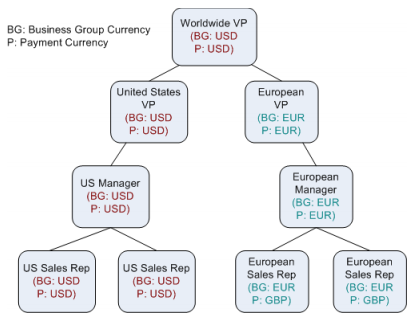
The worldwide VP and the United States VP are paid in USD. The European VP is paid in
EUR. Managers and sales representatives in the United States are paid in USD, and
managers and sales representatives in Europe are paid in EUR or GBP as defined in
their payment currency on their Person record.
Orders can come into the application in 14 different currencies. Because quotas in
our example are calculated in USD and EUR, orders are converted into these two currencies.
Payments are then calculated for 21 possible different payment currencies
that might be represented in the organization. (Payments are generated in the payment
currency of each person in the organization.).

The following calculations take place:
• Orders are calculated from their original currency into USD or EUR.
• Direct credits are calculated using the following formula:
Credit = OrderItem.SplitAmount * GetExchangeRate (OrderItem.Currency,
BusinessGroup.Currency, Incentive Date)
• Commissions, bonuses, and draws, as appropriate, are calculated from the credits
into USD or EUR (Business Group Currency = Result Unit Type).
• Payments are calculated into the appropriate currency, depending on each
employee’s Payment Currency.
If the Payment Currency is defined as GBP, and the calculation of credits and
commissions were completed in EUR, the application goes to the rate table to calculate
the exchange rate. If nothing is defined in the exchange rate table to convert
to GBP, the payment will be made in EUR, as originally calculated.
The application calculates payment in these four currencies:
• Payment Currency (the total amount a person is paid in their Payment Currency)
• Business Group Currency (as defined by their Business Group)
• Business Currency (as defined in Setup > Preferences > BUSINESS_CURRENCY)
• Item Currency (as defined on the Order)
note: If the exchange rate table lacks information to convert data from one currency
to another, the GetExchangeRate system function returns 0 (zero). For
example, consider the following formula:
Order Item Split Amount * GetExchangeRate(USD,EUR,IncentiveDate)
If the exchange rate is not defined, the GetExchangeRate function returns 0.
Only the Payment Currency calculation represents what a person in the organization
is actually paid.