
Xactly Objectives 2017-06 New Features
This article describes the new features available in Xactly Objectives 2017-06, which include:
- Configurable Notifications and Reminders
- Audit History Report
- Xactly Analytics Integration
Configurable Notifications and Reminders
Xactly Objectives 2017-06 significantly enhances email notifications, providing greater control over content and branding while improving the communication experience for managers and employees.
 Notifications Screen
Using the enhanced Plan Design > Notifications area, administrators can now configure email content for six scheduled actions and 12 immediate actions. Scheduled notifications are delivered automatically based on due dates configured in the Plan Design > Periods area, and are only sent to users who have not yet completed the action. User action notifications, in contrast, are delivered immediately when a user performs a specific action, including clicking the Submit Plan button or clicking the Approve button.
When customizing notifications and reminders, administrators can modify the content of each email, including dynamic variables, images, and text formatting. In addition, each scheduled notification has an optional reminder configuration. Administrators can customize the reminder content separately from the initial notification, and can adjust the number of times the reminder is sent.
Audit History Report
Xactly Objectives 2017-06 adds a new audit history report that administrators can use to details all data modifications within the application. This audit data can be very helpful when troubleshooting user questions or other issues, allowing administrators to pinpoint changes, and determine who made the change and when it took place. Additionally, the data allows administrators to quickly respond to auditing or compliance requests regarding data modifications.
Accessible through the new Audit menu item, the resulting Microsoft Excel report can be filtered by users, date range, and Objectives area.

Download Audit Data Screen
Note: Audit information is only available from June 23, 2017 and later. Administrators can download audit data for a maximum of one year at a time.
Xactly Analytics Integration
Xactly Objectives 2017-06 now offers Xactly Analytics users access to Objectives data, allowing users with the ability to create Analytics dashboards and reports to include data from both Xactly Incent and Xactly Objectives.
The Objectives data is available through the following dimensions and fact:
- Objective dimension
- Objective Plan dimension
- Objectives fact
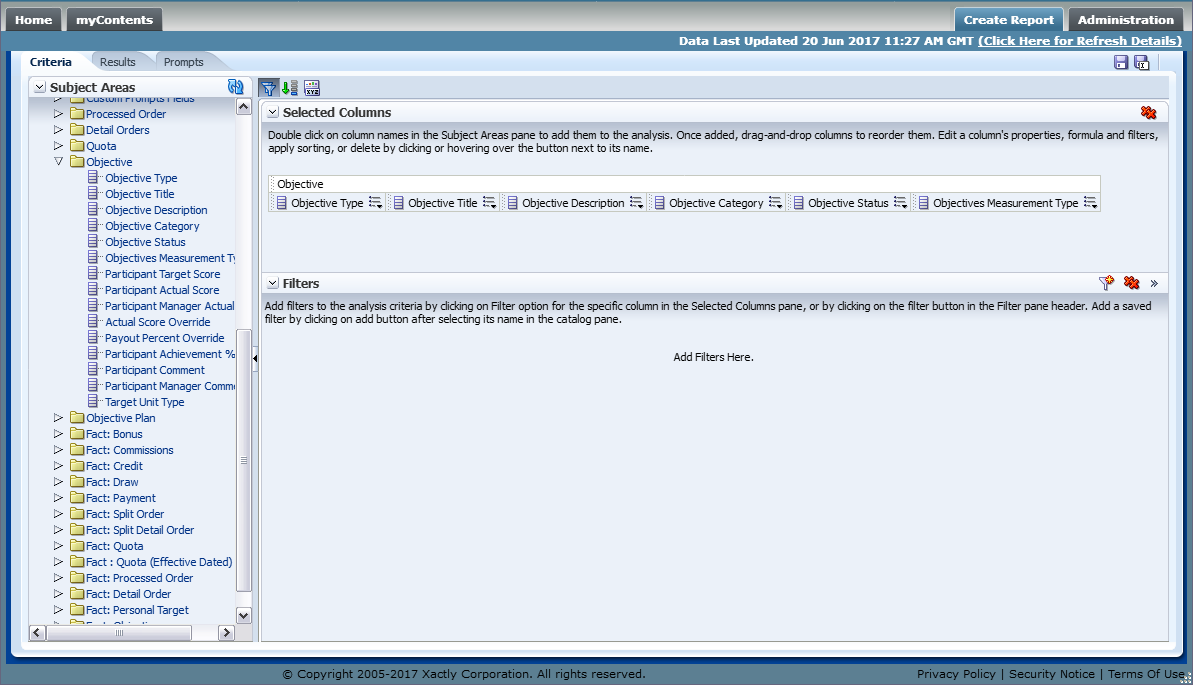
Objective Dimension
Specifically, the Objective dimension provides information about the objective type, description, achievement percentage, participant and manager scores, along with manager comments, among other details. The Objective Plan dimension offers details about the plan name and status, together with plan workflow details. Finally, the Objectives fact allows users to analyze and report on Xactly Objectives data associated with payments.
This access to Objectives data allows organizations to provide a more complete picture of both financials and achievements. In addition, executives will now be able to view summary or detailed Objectives information for their organization.